Ecommerce platforms evolve quickly, and so do customer expectations. At some point, every growing online business reaches a stage where its current platform becomes limiting whether due to performance issues, lack of features, technical debt, or scalability challenges.
This guide explains what ecommerce replatforming and migration mean, why they matter, and how to approach them safely without disrupting your store’s performance or search visibility.
What Is Ecommerce Replatforming?
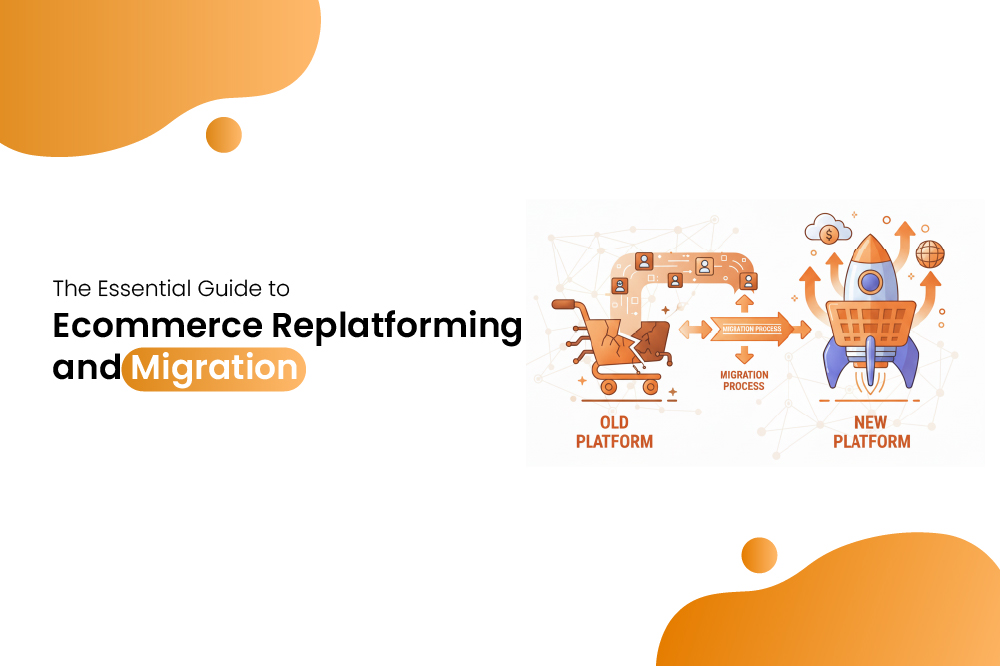
Ecommerce replatforming is the process of switching your online store from one commerce platform to another.
It typically involves:
- Adopting a new backend system.
- Moving to a platform with better scalability or features.
- Upgrading from legacy or custom-built systems.
- Replacing outdated technology with modern, cloud-based solutions.
Replatforming is a strategic decision, it aims to support long-term growth, reduce operational friction, and future-proof the business.
What Is Ecommerce Migration?
Ecommerce migration is the execution part of replatforming. It focuses on transferring all business-critical assets to the new system, including:
- Product catalog
- Customers and orders
- Inventory
- Categories
- Content (blogs, pages, media files)
- Coupons and discounts
- Reviews
- SEO metadata
- Integrations and automation
- Custom scripts
While replatforming is about choosing to move, migration is about how the move happens.
Signs It’s Time to Replatform
Common indicators include:
- Slow performance or frequent errors.
- High maintenance effort.
- Missing essential ecommerce features.
- Checkout friction.
- Difficulty integrating new tools.
- Limited reporting or automation.
- Security concerns.
- Rising technical debt.
- Poor mobile experience.
If your platform is holding back growth, replatforming may be the right move.
Things to Consider Before Replatforming Your Ecommerce Business
Replatforming is a major strategic move, and the quality of your preparation directly impacts the success of the migration. Before committing to a new platform, evaluate your business requirements, long-term goals, technical constraints, and operational readiness. This helps prevent unexpected costs, data issues, SEO risks, and workflow disruptions.
1. Clarify your business goals
Make sure the new platform aligns with the direction your business is growing.
Consider whether it supports:
- Expansion into new markets or regions.
- Multichannel or omnichannel sales.
- Advanced personalization or automation.
- Better backend workflows for your team.
A platform should enable scale, not just solve current problems.
2. Assess the Total Cost of Ownership (TCO)
Replatforming involves more than a subscription upgrade, it affects your entire cost structure. Compare the full financial picture, including:
- Development and implementation.
- Ongoing maintenance.
- App/add-on ecosystem costs.
- Payment and transaction fees.
- Data migration, design work, and third-party services.
Understanding TCO upfront helps avoid overspending later.
3. Evaluate scalability requirements
Choose a platform that can grow with your business. Review its ability to handle:
- Traffic spikes during sales or seasonal peaks.
- Large or expanding product catalogs.
- Multiple warehouses, locations, or inventory sources.
- Higher order volumes without slowing down.
- Scalability ensures stability as your store expands.
4. Review security and compliance standards
Your new platform should provide strong built-in protections. Check for:
- PCI DSS compliance for secure payments.
- SSL and data encryption practices.
- Fraud prevention and risk controls.
- Privacy compliance features. (GDPR, CCPA, etc.)
Security lapses during migration can lead to serious financial and legal risks.
5. Understand the SEO implications
Replatforming can significantly impact search visibility if not handled carefully. Pay attention to:
- URL structure changes.
- Redirect mapping and link equity.
- Structured data and schema differences.
- Page speed and Core Web Vitals.
- Indexing behavior after launch.
A strong SEO plan minimizes ranking drops during migration.
6. Check your existing customizations
Identify custom features you currently rely on and confirm whether they can be replicated or rebuilt. Consider:
- Automated workflows.
- Custom logic or scripts.
- API-based integrations.
- Niche functionality that apps alone cannot replace.
This prevents losing critical business processes.
7. Measure data complexity
The more complex your store’s data, the more meticulous your migration plan should be. Stores with:
- Large product catalogs.
- Multiple variations.
- Multi-year order histories.
- Deep customer segmentation.
…require careful mapping and validation.
8. Ensure team readiness
Your team must be comfortable using the new platform and its tools. Evaluate whether:
- Staff can adapt to new workflows.
- Training will be needed.
- Internal processes must be updated.
Adoption challenges can slow down operations after migration.
9. Choose the right timing
A poorly timed migration can cause revenue loss. Avoid:
- Peak sales seasons
- Holidays
- Large campaign periods
- Inventory transitions
Choose a low-risk window with enough buffer for testing.
10. Review platform stability and ecosystem roadmap
Always choose a platform backed by innovation and long-term support. Look for:
- Regular product updates.
- A strong developer ecosystem.
- Reliable support channels.
- Clear roadmap for new features.
This ensures the platform remains future-ready.
Step-by-Step Ecommerce Migration Process
Once the decision to replatform has been made, a structured migration plan ensures a smooth transition. Ecommerce migration involves moving data, workflows, and SEO assets from the current platform to the new one while minimizing downtime and avoiding disruption to sales. Below is a step-by-step approach to guide the process effectively.
1. Conduct a pre-migration audit
Before starting the migration, audit your current store thoroughly. Identify:
- Existing site structure and navigation.
- Product catalog and categories.
- Customer data and order history.
- SEO performance, metadata, and backlinks.
- Integrations with apps, payment gateways, and third-party services.
This audit serves as the baseline for migration and highlights potential challenges.
2. Plan platform selection and configuration
Choose the platform that meets your business needs and prepare the environment for migration. Consider:
- Platform setup and account configuration.
- User roles and permissions.
- Themes, templates, or front-end design requirements.
- Required apps and integrations.
Having a clear plan reduces surprises during data transfer and setup.
3. Map out data migration
Data is the backbone of any ecommerce store. Plan how each asset will be transferred:
- Products, variants, and categories.
- Customer profiles and order histories.
- Inventory levels and pricing rules.
- Discounts, coupons, and promotions.
- Media files and content. (blogs, pages, images)
Ensure proper mapping to maintain consistency and prevent data loss.
4. Prepare for SEO preservation
Protecting search engine visibility is crucial. Include:
- URL mapping for 301 redirects.
- Maintaining structured data and schema markup.
- Preserving metadata, alt text, and heading structure.
- Updating sitemaps and submitting them to search engines.
Early planning ensures minimal disruption to organic traffic.
5. Rebuild store structure and design
Once the data mapping and SEO plan are ready, rebuild the store on the new platform:
- Set up categories, navigation menus, and filters.
- Configure payment gateways, shipping methods, and tax rules.
- Apply templates or themes and customize for branding.
- Integrate essential apps or plugins.
Focus on maintaining a seamless user experience.
6. Conduct thorough testing
Before going live, verify that everything works as intended:
- Test checkout and payment flows.
- Verify product availability, inventory, and pricing.
- Check page speed and responsiveness on mobile devices.
- Ensure integrations, forms, and APIs function correctly.
- Validate redirects and SEO elements.
Testing at this stage prevents post-launch issues that could affect sales or rankings.
7. Launch the migrated store
Once testing is complete, schedule the launch during a low-traffic period. Monitor:
- Site uptime and performance.
- Customer activity and transactions.
- Any errors or broken links.
A careful launch reduces downtime and ensures continuity of operations.
8. Post-launch monitoring and optimization
Migration doesn’t end at launch. Continuous monitoring ensures the new store runs smoothly:
- Track analytics and KPIs for traffic, sales, and conversions.
- Identify and fix broken links or misconfigured redirects.
- Optimize page speed, UX, and navigation.
- Monitor SEO rankings for any drops and address issues.
- Ongoing attention guarantees long-term benefits from the replatforming effort.
Cost of Ecommerce Replatforming
Costs vary depending on:
- Store size
- Custom features
- Platform choice
- Number of integrations
- Data volume
- Development complexity
Expenses typically fall into:
- Platform subscription
- Migration services
- Design/theme customization
- App integrations
- SEO support
Conclusion
Replatforming and migration are major decisions that can significantly shape an ecommerce business’s future. When done thoughtfully, they improve performance, simplify operations, and create space for growth. The key is to approach the process with clarity, preparation, and a strong focus on data and SEO integrity. With the right planning, migrating your ecommerce store becomes an opportunity to build a more flexible, scalable, and resilient foundation for the years ahead.