When shopping for clothes, shoes, or accessories online, customers worry most about one thing-fit. In fact, over 40% of ecommerce returns happen due to sizing issues. The fix? A clear, customer-friendly product size chart that builds trust, improves shopping experience, and reduces costly returns.
What is a Product Size Chart?
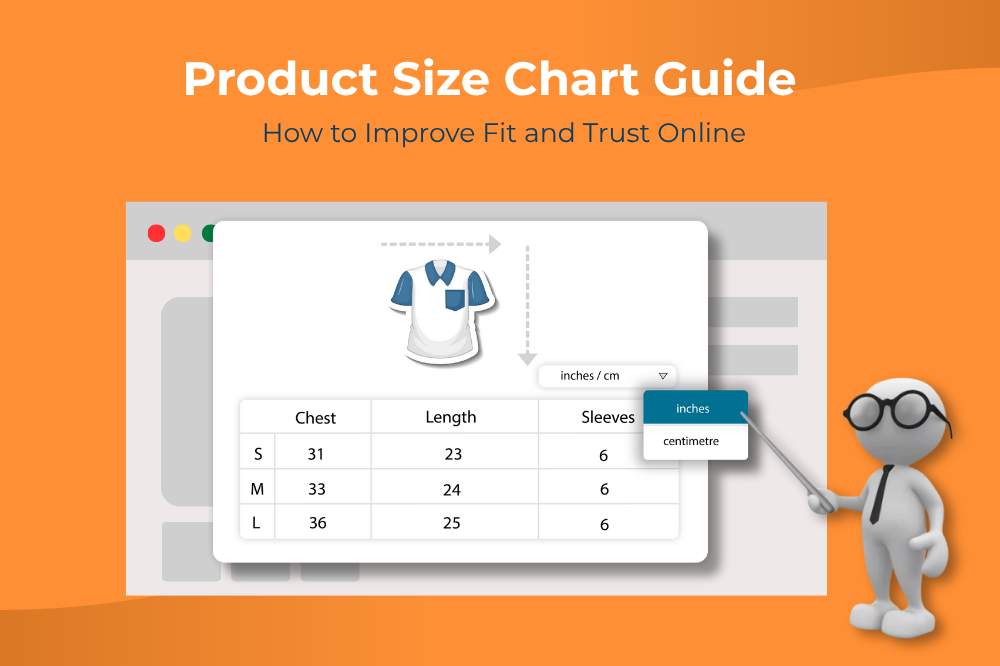
A product size chart is a structured fit guide that matches body measurements to product sizes. In ecommerce, a product size chart is designed to reduce uncertainty, improve customer confidence, and lower return rates.
It eliminates the guesswork, ensuring buyers feel confident about their purchase, and helping online stores reduce returns and increase loyalty.
Here’s why every ecommerce business should use them
- Reduce returns – Incorrect sizing is the #1 reason for ecommerce returns. A clear and accurate size chart helps customers pick the right fit, reducing costly returns.
- Build customer confidence – When shoppers know exactly what they’re buying, they’re more likely to complete the purchase.
- Improve conversion rates – A simple, easy-to-read size chart removes hesitation and boosts “Add to Cart” clicks.
- Support global shoppers – Ecommerce stores serve international customers. Always account for regional differences in sizing (US, UK, EU, Asia) and include unit conversions (inches ↔ cm). This prevents confusion and broadens your global reach.
- Save costs for retailers – Accurate size charts not only increase conversion rates but also boost customer loyalty and protect long-term profit margins.
Best Practices for Effective Size Charts
Here are additional ways to enhance your product size charts and give shoppers the confidence they need to buy. To make yours truly helpful and user-friendly, follow these best practices:
Use plain, consistent language
Avoid jargon or confusing abbreviations. Make sure anyone can understand the sizing at a glance.
Differentiate by audience
Offer separate guides for men, women, and children when relevant. Gender-based sizing charts make shopping easier.
Highlight customer photos and feedback
Encourage buyers to upload photos wearing the product along with their height/weight. It builds trust and shows how the item looks in real life.
Show real models in action
Use lifestyle photos of models with their height and size mentioned. Customers can visually compare themselves for a better fit decision.
Offer non-measurement cues
Use relatable descriptions like "relaxed fit," "tailored cut," or "slim fit" for customers who may not want to measure themselves.
How Do You Make a Brand Size Chart?
If you’re starting small, you can create a size chart in Google Sheets or Excel, list your product measurements (in inches and centimeters), take a screenshot, and upload it to your product pages. This approach works-but it’s also manual, time-consuming, and limited:
- Updating charts requires editing spreadsheets and re-uploading images.
- There’s no way to personalize or localize sizes for different regions.
- Customers still have to interpret measurements on their own, which can lead to confusion.
That’s why most growing ecommerce brands rely on dedicated size chart tools. These tools make it easy to:
- Display charts interactively right next to the "Add to Cart" button.
- Update once, sync everywhere-no manual uploads.
- Support brand-specific and gender-based charts for better accuracy.
Build Your Product Size Charts with ZenBasket
ZenBasket’s Product Size Chart plugin solves this by making sizing clear, customizable, and customer-friendly. Here’s what makes it stand out:
- Detailed fit guides - Map standard body measurements to each available size, so shoppers can easily pick the right fit-whether they prefer a relaxed or tailored style.
- Customizable design - Adjust display settings, icons, colors, fonts, and overlays to match your brand style.
- Flexible placement - Apply charts to specific products, categories, or brands, ensuring accuracy at every level.
- Smart measurements - Add size chart tables with features like auto unit conversion and range-based values for more accurate sizing.
- Easy editing - Easily align chart items and add or remove rows without starting over.
- Multi-level mapping - If both a product and its category have size charts, ZenBasket prioritizes the product’s specific chart for clarity.
This means fewer returns, higher conversions, and a smoother shopping experience that keeps customers coming back.
Conclusion
The right size chart can be the difference between a confident purchase and an abandoned cart. With the ZenBasket size chart feature, your store goes beyond offering simple measurements-it provides a clear, brand-specific fit guide that customers can rely on. By turning sizing into a seamless part of the shopping experience, ZenBasket helps reduce returns, strengthen customer trust, and improve overall sales. In today’s competitive ecommerce space, having an accurate and customizable online store fit guide isn’t just a nice-to-have-it’s a must for building lasting customer relationships.
Product Size Chart FAQs
1. What is a product size chart in ecommerce?
A product size chart is a measurement guide that helps customers find the right fit, reducing uncertainty and returns.
2. How do size charts reduce returns?
By guiding customers toward accurate sizing, they prevent mismatched purchases and lower return rates.
3. How does a sizing chart work?
A sizing chart works by mapping body measurements (like chest, waist, hips, or foot length) to standard size labels (S, M, L, XL, etc.). This helps customers compare their measurements with the chart and choose the right size without guessing.
4. What is a size run in retail?
A size run refers to the range of sizes a retailer or brand produces for a specific product. For example, a T-shirt might come in a size run from XS to XXL. Retailers often use complete size runs when stocking inventory to cover all customer needs.
5. What are the best practices for creating a size chart?
Keep charts clear, consistent, mobile-friendly, and include global size conversions.