With a plethora of options available, customers can experience decision fatigue, making it hard to choose the best product quickly. To grab their attention, it’s important to think outside the box. One effective way is to subtly highlight key aspects of your products at a glance. By focusing on specific details without overwhelming the viewer, you can create a smoother, more engaging shopping experience. This is where product badges come in. These simple yet powerful tools can help simplify decision-making and guide customers to the right products.
What Are Product Badges?
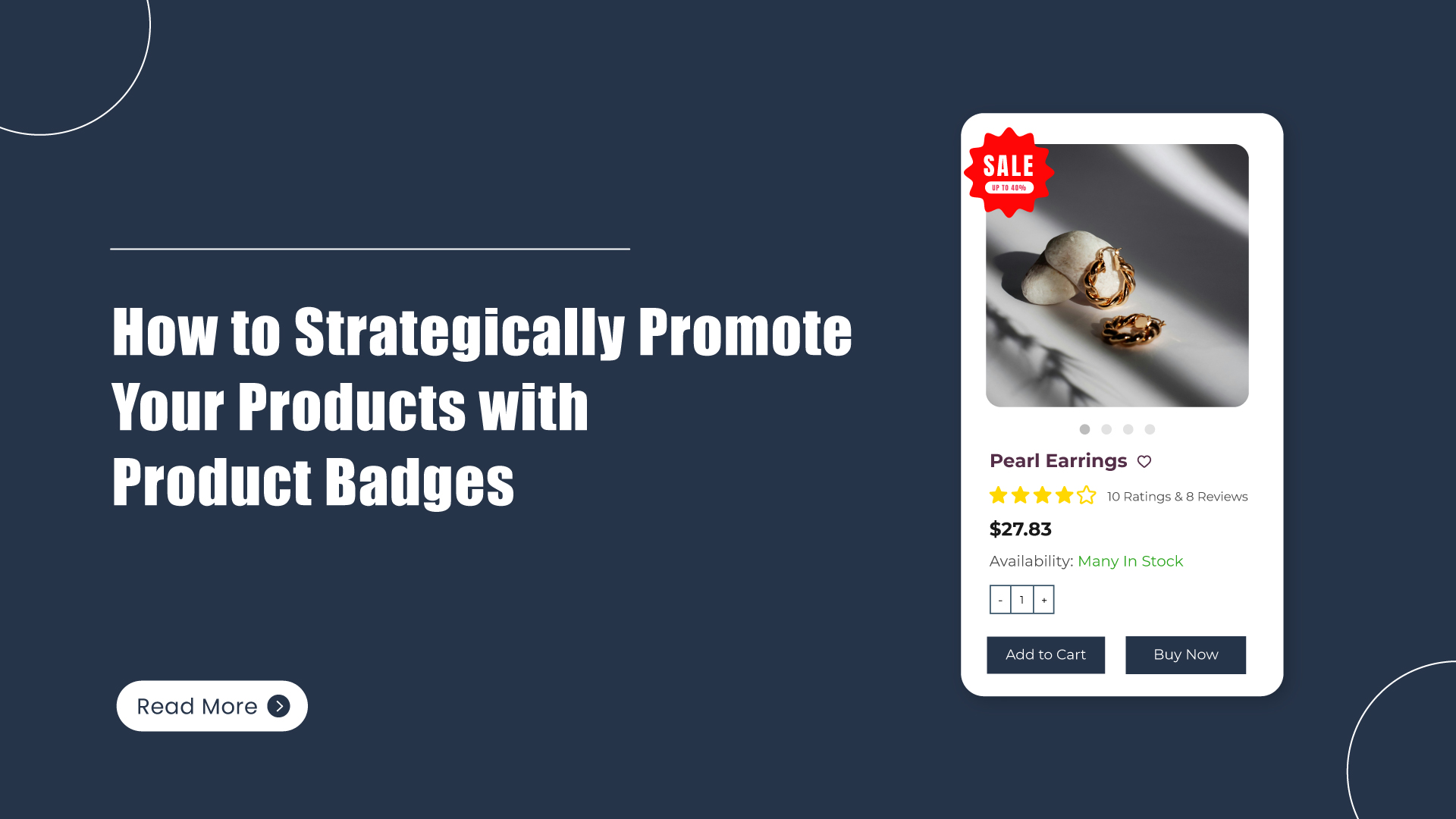
Product badges are small, visually distinct labels or icons placed on product images in online stores to highlight specific features, offers, or attributes of a product. These badges are typically used to grab a shopper's attention and provide important information quickly. They often appear as small, circular, rectangular, or banner-style graphics that can display text or symbols, making them an essential tool for ecommerce businesses to communicate product benefits in a clear and concise way.
When to Use Product Badges for Your Products
1. Highlight Promotions and Discounts
One of the most common uses of product badges is to showcase discounts or promotional offers. Whether you're running a seasonal sale, offering limited-time deals, or promoting a clearance event, a badge is an excellent way to catch the shopper's eye. Using a simple "SALE," "20% OFF," or "LIMITED TIME" badge on the product image can create a sense of urgency and encourage customers to make a purchase before the deal expires.
2. Showcase New Products
When launching a new product, it’s essential to give it a prominent spot on your website. A badge that says "NEW" can alert your customers to the latest additions to your store, making them more likely to explore what’s new. It adds a sense of excitement and curiosity, enticing visitors to check out the new items you have to offer.
3. Indicate Best Sellers or Popular Products
If you have a product that consistently outsells others, why not highlight its popularity? A badge that says "BEST SELLER" or "TOP RATED" can help customers quickly identify products that other shoppers have loved. This social proof helps build trust and can influence new buyers who may feel more confident purchasing products that others have already endorsed.
4. Denote Eco-Friendly or Ethical Products
With an increasing number of consumers becoming environmentally conscious, highlighting your sustainable products with a "GREEN" or "ECO-FRIENDLY" badge can help you stand out in the marketplace. These badges serve as quick visual cues for customers looking to make ethical and environmentally conscious purchases. They also show your store’s commitment to sustainability, which can be a huge selling point for certain demographics.
5. Point Out Limited Stock or Exclusivity
For products with limited availability or exclusive items, badges such as "LIMITED STOCK" or "EXCLUSIVE" can create a sense of urgency. This can motivate customers to act quickly and purchase before the item sells out, capitalizing on the fear of missing out (FOMO). It’s also an effective way to promote rare or special edition items that are not available elsewhere.
6. Highlight Special Features or Attributes
Sometimes, a product badge can be used to emphasize a specific feature of a product that might appeal to certain customers. Whether it’s "Waterproof," "Free Shipping," "Size Inclusive," or "Made in USA," badges can help inform customers about the attributes they care most about without cluttering the product description. These badges can enhance the appeal of products by showcasing key features at a glance.
7. Offer a Guarantee or Warranty
Trust is key to converting a visitor into a customer. If your store offers a satisfaction guarantee, warranty, or return policy, placing a badge on your product images can help reduce hesitation and build confidence. A badge like "30-Day Return Policy" or "Lifetime Warranty" reassures potential customers that they are making a risk-free purchase, which could be the deciding factor in their buying decision.
8. Display Customer Ratings
Customer ratings are a powerful form of social proof, and using a badge with the average rating or number of reviews can help potential buyers feel more confident in their decision. For example, a badge saying "4.5 Stars" or "100+ Reviews" can demonstrate that others have had positive experiences with the product, influencing the new customer’s purchase decision.
9. Promote a Specific Brand
If you're working with a brand that has strong recognition or a loyal following, featuring a badge with the brand’s logo or a statement like "Official Product" can build instant trust. Customers who know and trust the brand will be more likely to purchase if they see that it’s authentic. A badge can reinforce the brand’s reputation and attract shoppers who are already loyal to that name.
How to Create Product Badges In No Time
If you’re clear on what product badges can do, let’s jump in and create one in your ZenBasket store.
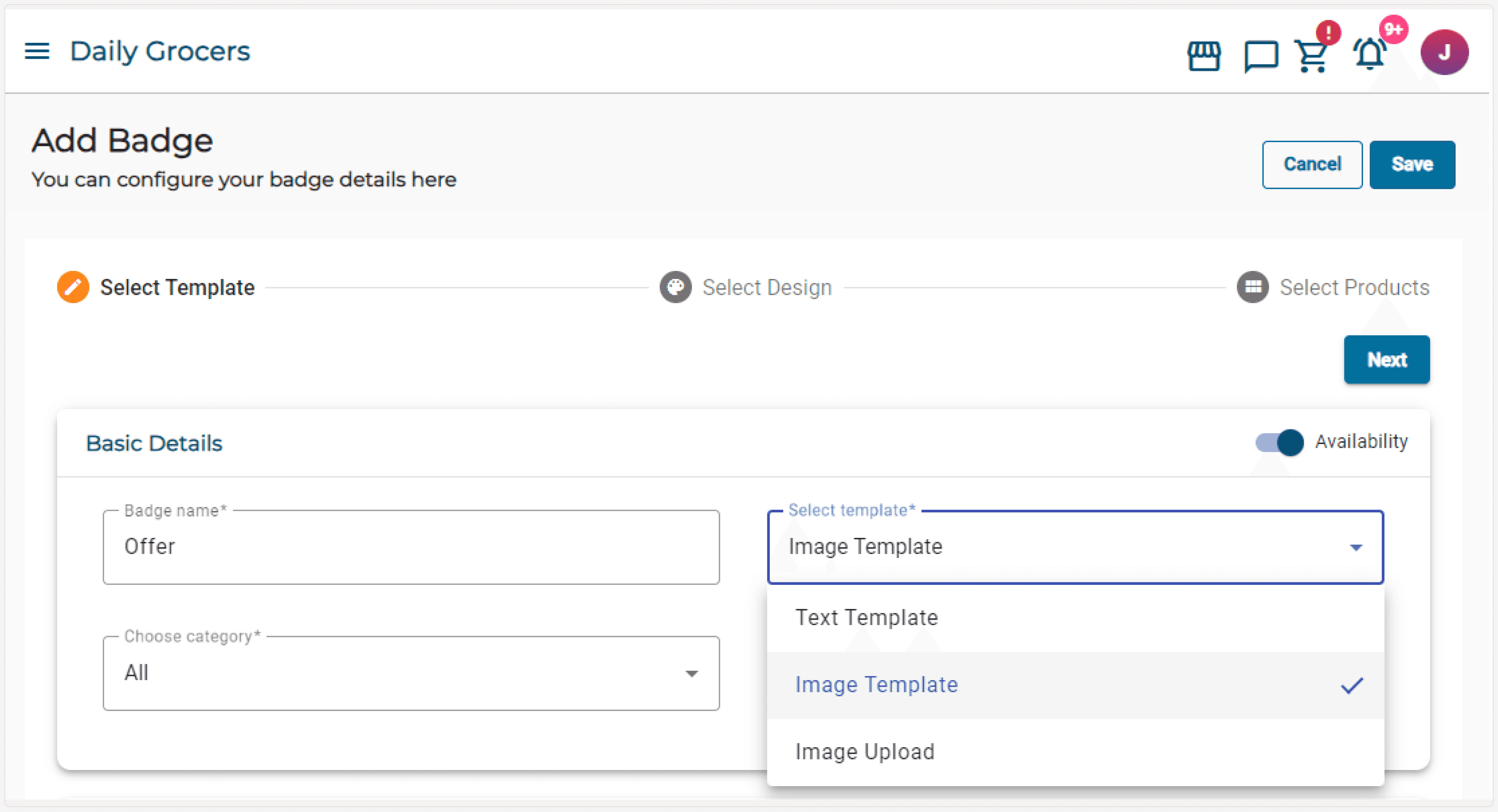
1. Choose a Template That Fits Your Brand
Start by selecting a template that aligns with your store’s aesthetic and the purpose of the badge.
ZenBasket offers three options:
- Image Template: Ideal for visually impactful badges.
- Text Template: Perfect for straightforward messaging.
- Custom Image Upload: Great for incorporating your unique brand visuals into the badge design.
Take a moment to consider how each option complements your store’s layout and product imagery.
2. Customize Your Badge Style
Next, tailor the badge’s design to make it stand out yet harmonize with your store’s theme. Here’s what you can tweak:
- Size: Choose between a fixed size or scale it as a percentage of the product image.
- Position: Decide where the badge will appear-top-left corner, center, or even offset to the side for a unique touch.
- Width and height: Ensure the badge doesn’t overwhelm the product image but remains noticeable.
- Transparency: Adjust to achieve the perfect balance between visibility and subtlety.
A well-designed badge should catch the customer’s eye without detracting from the product itself.
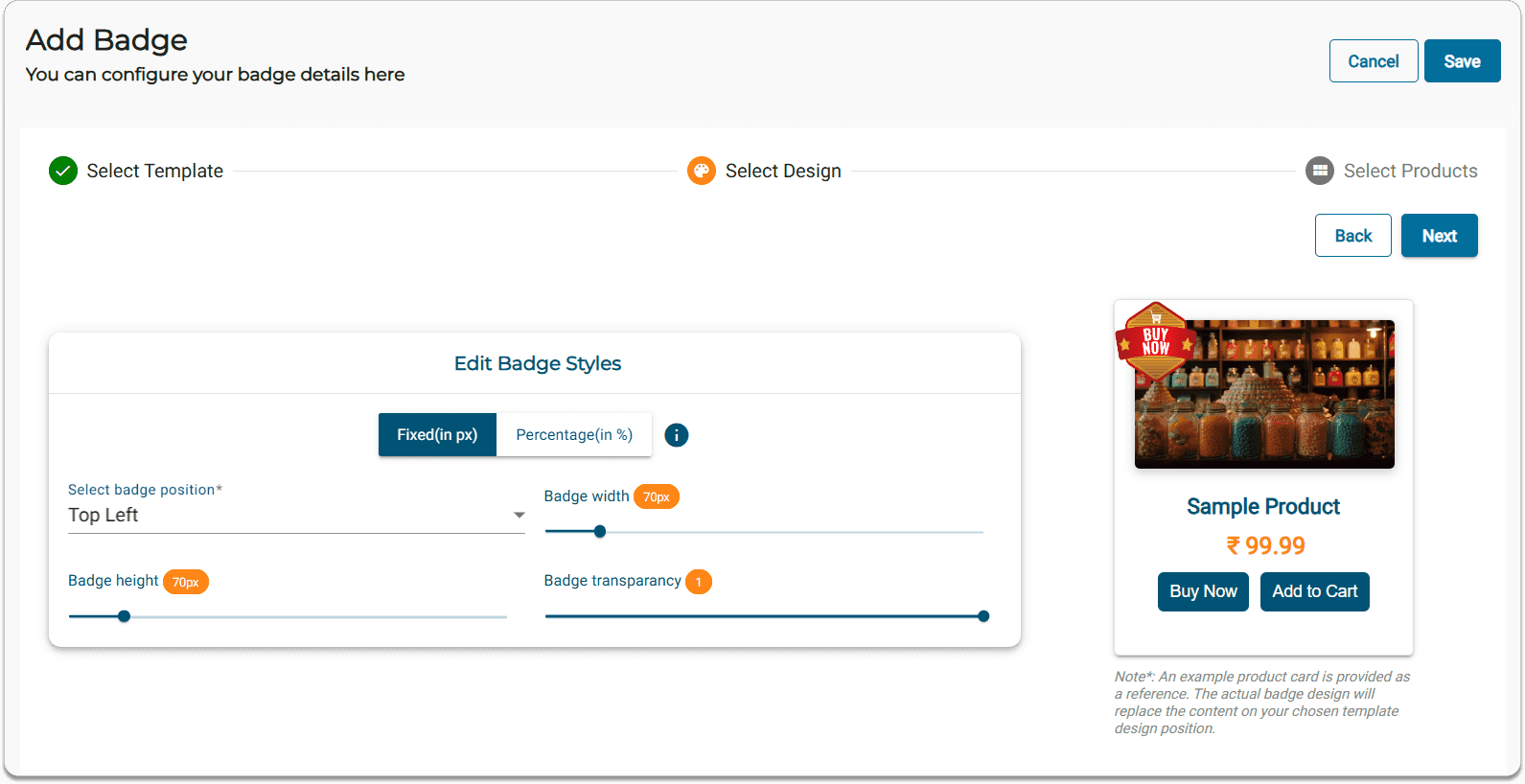
3. Assign the Badge to Products
Now, decide where your badge will be applied:
- Individual Products: Use this for highlighting specific items.
- Specific Categories: Apply badges to a particular category.
ZenBasket’s flexible assignment system ensures that your badges are always relevant and impactful.
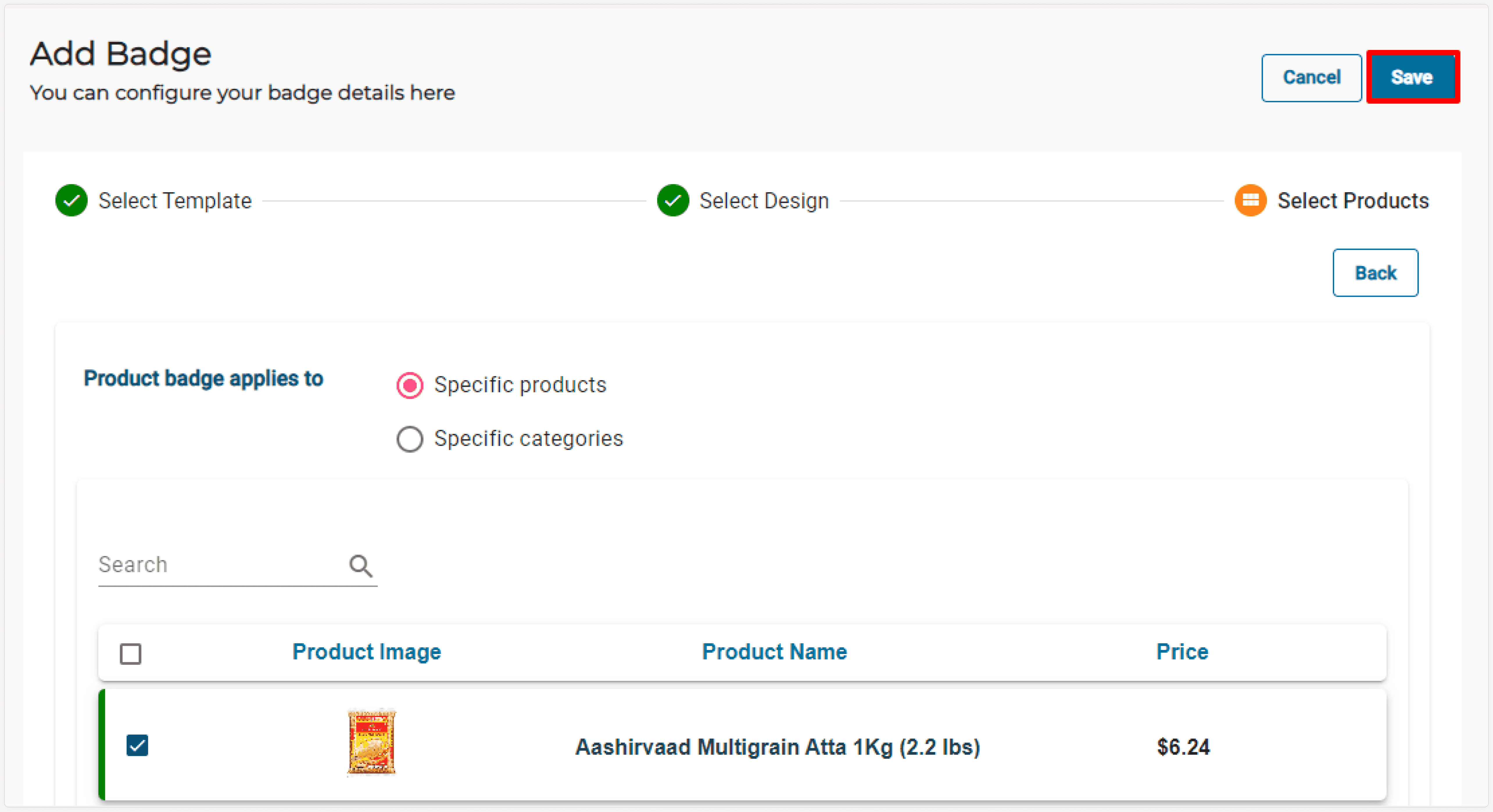
Once satisfied, save your design. Your badge will immediately appear on the selected products, enhancing their appeal and helping shoppers make faster decisions.
Conclusion
The number of badges you use on a product depends on your overall strategy and positioning. For some brands, a minimalist, premium look is essential. In these cases, fewer badges may be more appropriate to maintain a sleek, refined appearance. Overusing badges can make a product appear cluttered or desperate for attention.
On the other hand, if you are selling in a highly competitive market, more badges may be necessary to differentiate your products and attract attention. The key is to strike a balance between informing customers and not overwhelming them with too much information at once.
A well-placed, visually appealing badge can drive higher conversions by providing instant information. Whether it’s to announce a discount, showcase a trending product, or mark an item as eco-friendly, badges are a proven way to grab attention and influence buying behavior.
Ready to take your online store to the next level? Start building with ZenBasket today and easily create product badges to highlight your best products and boost customer engagement!