Back

How to Build a Digital Kirana Store | ZenBasket

Build a digital kirana store from your existing shop, accept direct orders, enable UPI or COD, offer local delivery and share your link on WhatsApp.


How to Build a Digital Kirana Store | ZenBasket

How to Build a Digital Kirana Store from Your Existing Shop in 2026

A digital kirana store is a neighborhood grocery shop that also accepts online orders. Customers can browse products on their phones, add items to a cart, pay through UPI or cash on delivery, and choose home delivery or store pickup from the same local shop they already know. Building a digital kirana store does not mean rebuilding the business you already run. Start with a simple mobile-friendly store, add the products customers buy most, accept familiar payment methods, and offer delivery or pickup in the areas you already serve. With ZenBasket, you can start without any technical knowledge and let customers order even without creating an account.

You already have the most important parts of the business: products, local customers, supplier relationships and a shop people know. Going online should make those existing strengths easier to use, not turn your store into a technology project.

That is the approach. Start small, make ordering simple for customers, learn from the first few orders and expand only when it makes sense. kk

Can You Take Your Kirana Store Online Without Coding?

Yes. For a kirana owner, the easiest starting point is not to hire a developer or build an app. It is to create a simple online store that works on a customer's phone and gives them a clear way to browse, order, pay and choose delivery or pickup.

ZenBasket provides a no-code drag and drop setup, ready-made customizable themes and you can initially use the free ZenBasket subdomain, so purchasing a custom domain is not required before launch. Stores are mobile-friendly, and hosting and SSL are handled by the platform. If you later want your own domain, you can connect it without rebuilding the store.

You can also try the setup before committing to a paid plan. ZenBasket currently offers a 14-day free trial with no credit card required. If you get stuck, the ZenBasket admin provides access to Help Center articles, videos, blogs and contact support.

You do not need all of this on day one. Begin with the products, customers and delivery area you already know.
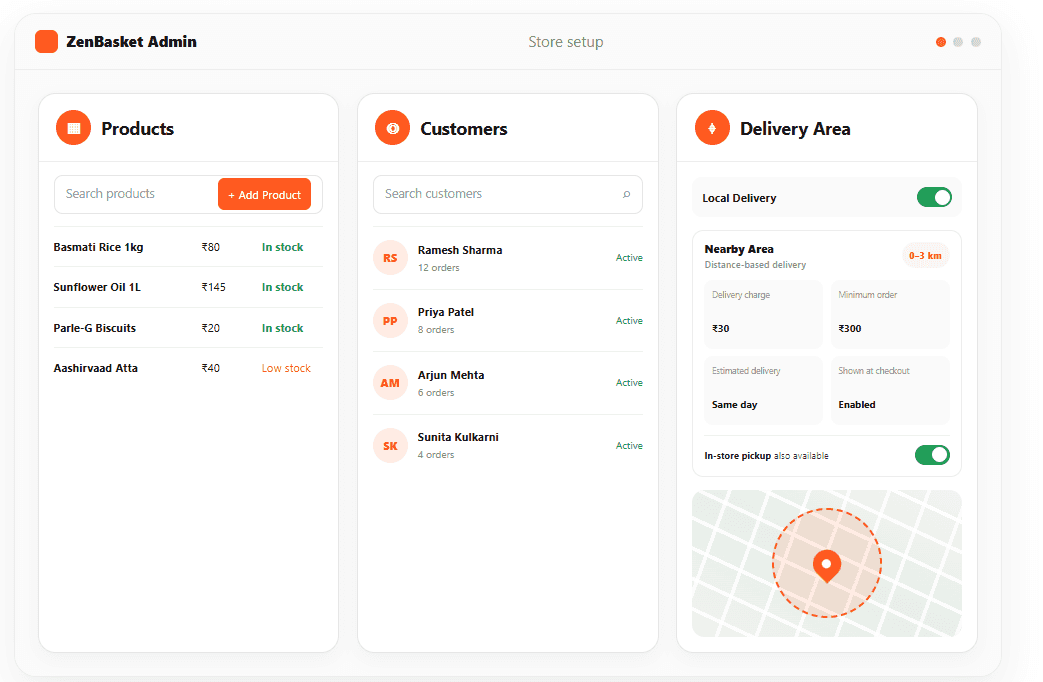
Admin showing products, customers, and local delivery area setup for a kirana store

How to Build an Online Kirana Store?

To take an existing kirana store online, start small, then expand the catalogue as online ordering grows.

  • Start with the products your customers buy most.
  • Create a branded online storefront for your kirana shop.
  • Make checkout easy, even for customers who do not want an account.
  • Enable supported online payments, UPI options and COD based on your payment setup.
  • Set the nearby areas you can deliver to, or offer store pickup.
  • Share your store link with existing customers through WhatsApp and other channels.
  • Review incoming orders, payment status and fulfilment progress from your store admin.
ZenBasket setup flow for taking a kirana store online, from products and storefront to delivery and orders.

Start with the products your customers buy most

A neighborhood kirana may stock hundreds or thousands of items, but your first online catalogue does not need to contain the whole shop. Start with the products customers ask for every day: staples, milk products, snacks, beverages, personal care and household essentials.

A practical first catalogue could contain 50 to 100 frequently purchased items. Organize them into familiar categories and use clear product names, pack sizes, prices and images. Once customers begin ordering, you will quickly see which categories need to be expanded first.

ZenBasket gives you several ways to reduce the work. You can add products individually, import a list in bulk, edit multiple products together, or use Readymade Products where suitable industry items are available. Inventory controls then help you keep quantities and availability updated.

Chhoti Shuruaat Kijiye
Pehle din hi apni poori dukaan online daalna zaroori nahi hai. Apne regular customers ke sabse zyada kharide jaane wale products se shuruaat karein. Pehla goal sirf itna ho ki customer aasani se ek useful grocery order place kar sake.

Setting up an online kirana storefront  

Your website should feel like your shop: simple, familiar and easy to use. Choose a ready-made theme, add your store name, logo and contact details, and keep the main product categories easy to find. Customers should not have to learn how your website works before they can buy atta, oil or biscuits.

ZenBasket themes can be customized without coding, and the storefront is designed to work on mobile devices. You can begin with a store address and connect your own domain later. That removes several technical decisions from the first day.

Before sharing the store, open it on your own phone as if you were a customer. Search for a common item, add it to the cart and complete a test checkout. If you can do it comfortably without instructions, your customers are much more likely to find it easy too.

Make checkout easy - Even for customers who do not want an account

For many kirana customers, the most important part of online ordering is not the design of the website. It is how quickly they can finish the order. Requiring a new username and password can create unnecessary friction for someone who simply wants groceries delivered home.

ZenBasket supports single-page checkout and lets a store enable guest checkout, so customers can place an order without signing in. They can review the items in their cart, change quantities or remove something before completing checkout. This keeps the buying process closer to the simplicity customers expect from a neighborhood shop.

Guest checkout is especially useful when you first introduce the store to existing customers. They can try the online ordering experience without feeling that they need to create a new account just to buy from a shop they already know.

ZenBasket guest checkout feature showing delivery, UPI or COD payment, and order summary without account signup

Let customers pay the way they already pay 

Do not make payment more complicated just because the order is online. If your customers are comfortable with UPI or cash, start there. Add other methods as customers need them.

ZenBasket supports Razorpay, Cashfree, PhonePe, COD and Advance COD. UPI payments can be accepted through compatible payment gateways. Payment-method availability depends on the merchant’s country, gateway account and store configuration. The best setup is the one your customers understand immediately. Show the available choices clearly, make sure the final amount is easy to see, and test each payment method before you start promoting the store.

Offer local grocery delivery  

Start grocery delivery with the area you can serve reliably. You do not need to cover the whole city. A smaller delivery radius that your team can handle consistently is better than promising delivery to areas that create delays.

  • Choose the nearby areas or zones you want to serve.
  • Set delivery charges and minimum-order rules where needed.
  • Set an estimated delivery date so customers know when they can expect their order.
  • Offer store pickup for customers who prefer to collect their order.
  • Decide whether your own staff or a third-party logistics provider will deliver.
  • Keep delivery details connected to the order so fulfilment is easier to organize.

ZenBasket's delivery and pickup settings can support these choices. The Routing capability can also help export relevant delivery details for planning. You will need to arrange delivery through your own staff or an external provider because ZenBasket does not supply delivery riders or include built-in live rider tracking.

ZenBasket also integrates with supported third-party delivery and shipping partners when you prefer to use an external provider for fulfilment.

Showing local delivery, shipping rates, pickup options, and routing setup for kirana orders settings in ZenBasket

Use WhatsApp to bring customers to your store link  

WhatsApp is already part of how many local shops communicate with regular customers. Going online does not mean you need to stop using it. The better approach is to use WhatsApp to send customers to a structured ordering experience.

Share your store link with regular customers, place it in WhatsApp Status when appropriate, and include it when you promote weekly deals or new stock. Instead of sending a long grocery list and waiting for manual confirmation, customers can browse the catalogue, select items and submit an organized order.

Customer ka simple online order journey
WhatsApp ya social media message → Store link kholen → Products browse karein → Cart mein add karein → UPI ya COD choose karein → Order confirm karein

ZenBasket supports WhatsApp marketing tools for businesses that want to run opted-in campaigns. Keep promotional communication permission-based and follow the rules that apply to your business and customers.

WhatsApp-to-order flow showing store link, product browsing, cart, checkout with UPI or COD, and order received

Keep online orders organized without changing every existing habit

Online ordering should reduce confusion at the counter, not create another pile of work. In ZenBasket, incoming orders can be reviewed with customer, payment and fulfilment details, and their progress can be updated as they are prepared, collected or delivered.

Customers who prefer to order online can use the storefront. Customers who still call or message can continue doing that. When Manual Order is enabled, an admin can also create an order on behalf of a customer, which gives you a way to keep those orders inside the same order-management process rather than leaving every phone order in a notebook or chat thread.

This gives you a gradual transition. You can encourage more customers to use the store link over time without telling long-time customers that the old ways have suddenly stopped.

Need to make a change after an order is placed? Depending on the available order features, you can update order details and statuses from ZenBasket. You can also send a bill to the customer, print the order invoice, add order notes, and send a Ready to Pick Up email for pickup orders.

ZenBasket Admin orders page showing online and manual orders together in one order list

What Gets Easier for Your Customers?

A digital kirana store is useful only if it makes buying easier for the customer. The most valuable improvements are usually very simple: they can see products without calling, prepare the order at their own pace, and finish the purchase without waiting for someone at the counter to reply.

What the customer may do today

What the online store can make easier

Call to ask whether an item is available.

Browse the catalogue and see what the store lists online.

Send a long grocery list on WhatsApp.

Add products and quantities directly to a cart.

Wait while every item and price is confirmed.

Review products, quantities and the order before checkout.

Create an account before ordering.

Use guest checkout when the store enables it.

Ask how to pay.

Choose from the payment methods the store makes available.

Call again about delivery or pickup.

Choose the available delivery or pickup option during the order.

This is why ease of checkout matters as much as the number of ecommerce features behind the store. The customer should experience the result, not the complexity.

Why Start with Customers Who Already Know Your Shop?

You do not need to wait for strangers to discover your website before online ordering becomes useful. Your first online customers can be the same people who already visit, call or message your shop.

That fits the strength of the kirana model: trust, proximity and familiarity. Customers still prefer buying from their local kirana stores, so using digital tools can help you serve your existing customers better without losing the personal connection.

Start by sharing the store with a small group of regular customers. Ask whether they could find products easily, whether checkout felt simple and whether the delivery or pickup information made sense. Those early orders will tell you what to improve before you promote the store more widely.

How Can You Give Regular Customers a Reason to Order Again? 

Once customers know how to order from your store online, the next step is giving them a reason to come back. You do not need complicated campaigns. Start with the same kinds of offers that already work in a neighborhood shop, weekly essentials, festival offers, discounts on selected products or rewards for regular customers.

ZenBasket lets you create manual and automatic discounts, loyalty rewards and customer groups for cases where you want to offer something specific to regular or VIP customers. You can also use supported email, SMS and WhatsApp marketing tools to share relevant offers and store updates with customers who have agreed to receive them.

Keep promotions simple and useful. A weekend grocery offer, festival bundle or loyalty reward can be more effective for a local kirana store than sending frequent promotions that customers start to ignore.

Can You Keep Your Existing Sales Channels? 

When you add an online store, your business may start receiving customers from several places at the same time. The important part is to decide how these channels work together, how customers move between them, and where you want repeat orders to happen. A simple channel strategy helps keep promotions, customer communication and order handling consistent as your digital presence grows.

Phone and WhatsApp orders 

Continue taking them when they are useful, especially for long-time customers who are not ready to change. At the same time, share the store link when it would save both the customer and your staff time. Manual Order support can also help you record eligible phone or message-based orders in the admin when that is part of your workflow.

Blinkit or other quick-commerce apps

If a quick-commerce or marketplace channel gives your store useful reach, you can continue using it according to that platform's terms. Your own store has a different role.

Area

Your own kirana store

Quick-commerce platform

Customer relationship

Direct relationship.

Platform-managed relationship.

Branding

Your store and domain.

Marketplace listing.

Customer return path

Customers return directly to your store.

Customers return to the platform.

Reach

Mainly existing and locally promoted customers.

Platform audience.

Fees and terms

No commission on sales orders; platform and payment-gateway charges may apply.

Marketplace-specific commissions, fees and terms.

Delivery

Managed by the store or chosen partner.

Depends on platform model.

The practical goal is not to force every customer into one channel. It is to make sure you have a direct channel of your own while using other channels where they genuinely help the business.

What Does It Cost to Take a Kirana Store Online? 

You do not need to choose a paid plan before you understand whether the setup works for your shop. ZenBasket currently offers a 14-day free trial with no credit card required, which lets you explore the store-building experience first.

When you are ready to continue, look at the full cost of running online orders rather than only the ecommerce subscription.

Cost item

Typical cost

Plan

ZenBasket plan

Current plan price

Based on catalogue and business needs.

Payment gateway

Approximately 1.95% - 2% + GST per successful domestic transaction

Charges vary by provider, payment method and merchant agreement.

Domain

Around ₹899 per year for a .in domain.

ZenBasket subdomain(free) can be used initially.

Delivery

Depends on own staff or third-party provider.

Not included in the platform subscription.

Store App

Optional

Not required to start.

For a small kirana owner, the sensible approach is to start with what is necessary for the first useful online order and add paid extras only when they solve a real business need.

A basic digital kirana store can usually be set up in a few days if you begin with 50–100 frequently purchased products. The exact time depends on product details, images, payment-gateway activation, delivery or pickup settings, and how much of the catalogue you want to publish before launch. Starting small helps you go live faster and expand later.

What Should a Kirana Owner Check Before Going Online? 

A simple setup still needs accurate business information. Before you share the store with customers, check the online experience from beginning to end and make sure it matches what your shop can actually fulfil.

  • Product names, pack sizes, prices and stock availability are accurate.
  • Delivery areas, charges, pickup details and minimum-order rules are clear.
  • Payment methods have been connected and tested.
  • The store works comfortably on a mobile phone, including guest checkout if you enable it.
  • Cancellation, return and customer-contact information reflects how your store operates.
  • Customer information and promotional messaging are used only for permitted purposes.
  • Licences, food-safety, tax, labelling and packaged-goods requirements that apply to your business have been checked.

For food businesses in India, FSSAI registration or licensing requirements can apply depending on the business, and packaged commodities can be subject to Legal Metrology requirements. These obligations remain with the merchant, so confirm the current rules that apply to your store and products.

Business Success Stories with ZenBasket 

Explore how kirana stores use ZenBasket to build a branded online presence, present their products clearly and give customers a direct way to browse and order online.

Adityan Oil Mill 

Adityan Oil Mill extends its physical business online with a branded storefront where customers can explore its cold-pressed cooking oil range and place orders directly.

View Store

Aariya Enterprises 

Aariya Enterprises complements its physical store with an online catalogue that helps customers browse products and order through a direct digital channel.

View Store

Yash Kitchen Renu 

Yash Kitchen uses its online storefront alongside its physical business to showcase products and make ordering more convenient for customers.

View Store

Digital Kirana Store FAQs 

Kirana store online kaise kare?

Sabse pehle ek mobile-friendly online storefront banayein aur un products ko add karein jo aapke customers sabse zyada kharidte hain. UPI ya COD jaise supported payment options enable karein, local delivery ya store pickup set karein, aur store link regular customers ke saath share karein. Online orders badhne ke saath catalogue ko expand kar sakte hain.

Kya existing kirana shop ko online store mein badal sakte hain?

Haan. Agar aap pehle se physical kirana shop chala rahe hain, to apne existing products, prices aur customer base ka use karke online ordering channel bana sakte hain. Products ko online catalogue mein add karein, payments aur delivery ya pickup configure karein, store ko mobile par test karein, aur phir customers ke saath link share karein.

Kirana store website kaise banaye?

Ek ecommerce platform aur grocery-friendly theme choose karein. Apne store ka naam, logo aur branding add karein, products ko categories mein organize karein, aur preferred domain ya store address connect karein. Checkout, payment aur fulfilment settings configure karein. Website ko simple rakhein, taaki customers phone se aasani se order kar saken.

Kya Kirana Store Online Karne Ke Liye App Zaroori Hai?  

Nahi. Kirana store ek mobile-friendly online storefront se shuruaat kar sakta hai, jise customers apne browser mein khol sakte hain. Agar business ko baad mein ek additional ordering channel chahiye, to branded customer app add kiya ja sakta hai.

Grocery delivery kaise start kare?

Sabse pehle us delivery area se shuruaat karein jahan aap consistently service de sakte hain. Zaroorat ke hisaab se delivery zones, charges aur minimum-order rules set karein. Yeh decide karein ki delivery aapki team karegi ya third-party provider. Store pickup ka option bhi de sakte hain. Un areas ya delivery timings ka promise na karein jinhe aap reliably fulfil nahi kar sakte.

Kya physical kirana store aur online store dono saath chala sakte hain?

Haan. Online store aapke business ke liye ek additional sales aur ordering channel hota hai. Aap walk-in customers ko serve karna aur phone ya WhatsApp orders lena continue kar sakte hain, saath hi customers ko digital kirana store se browse aur order karne ka option de sakte hain.

 Starting a Grocery Business from Scratch? 

This guide is for owners who already run a kirana shop. If you are still planning a new grocery business, use ZenBasket's broader grocery-startup guide for business-model, setup and ecommerce guidance.

Read the ZenBasket grocery ecommerce guide

Ready to Take Your Existing Kirana Store Online?  

Start with the shop you already have. Put a small set of everyday products online, let customers order from their phone without unnecessary steps, and offer the payment, delivery or pickup choices you can manage today. You can improve the store as customers begin using it.

With ZenBasket, you can try the setup without coding, use a ready-made mobile-friendly storefront and give customers a direct place to order from your business.

Start your free trial | Explore Sell Grocery Online